Well, I recently needed a quick sniffer test for pcap-ngs because it was producing unwanted work arounds for older packet captures needing conversions - here it is:
Welcome
Pacific Simplicity is the home to my tech blog of sorts, aiming to assist and provide information easily to other Linux users and Open Source hackers out there. It contains articles on Linux, system admin hints, scripting, programming embedded systems, OpenWRT and of course Drupal . Check it out and don't forget to comment!
Posted: Tue, 12/05/2017 - 18:15
Here is a quick script that is pretty handy!
#!/bin/bash
STR="Its a small world afterall"
CNT=$(wc -c <<< $STR})
TMP_CNT=0
STR="Its a small world afterall"
CNT=$(wc -c <<< $STR})
TMP_CNT=0
printf "Char Hex\n"
while [ ${TMP_CNT} -lt $[${CNT} -1] ]; do
printf "%-5s 0x%-2X\n" "${STR:$TMP_CNT:1}" "'${STR:$TMP_CNT:1}"
TMP_CNT=$[$TMP_CNT+1]
done
Which will output the following:
Posted: Mon, 12/04/2017 - 09:58
Here is a neat little script I wrote to remove spaces in CSVs recursively line by line using only pure Bash
#!/bin/bash
INPUT_CSV="test.csv"
INPUT_CSV="test.csv"
set IFS=,
set oldIFS = $IFS
readarray -t arry < ${INPUT_CSV}
for i in "${arry[@]}"
do
:
res="${i//[^ ]}"
cnt="${#res}"
while [ ${cnt} -gt 0 ]; do
i=${i/, /,}
cnt=$[$cnt-1]
done
echo $i
done
Posted: Sun, 11/19/2017 - 10:08
While writing an exercise for my book currently in editing, I wrote a quick utility for math operations on the CLI in Bash
/**
* @file main.c
* @author Ron Brash
* @date Nov 16, 2017
* @brief Create a simple math helper for CLI usage in Bash
*
* @note To compile:
* gcc -Wall -O2 -o mhelper main.c -lm
*/
#include <stdlib.h>
#include <stdint.h>
#include <stdio.h>
#include <string.h>
#include <ctype.h>
* @file main.c
* @author Ron Brash
* @date Nov 16, 2017
* @brief Create a simple math helper for CLI usage in Bash
*
* @note To compile:
* gcc -Wall -O2 -o mhelper main.c -lm
*/
#include <stdlib.h>
#include <stdint.h>
#include <stdio.h>
#include <string.h>
#include <ctype.h>
#include <math.h>
#define USAGE "%s <param1> <operation> <param2>\n"
#define TRUE 1
#define FALSE 0
// Function pointer for math operations
typedef void (*mathfpr_t) (double, double, uint8_t, uint8_t);
// Typedef of structure containing math operation function pointers
// think array of callbacks
typedef struct mathop_s {
char op;
mathfpr_t func;
} mathop_t;
// Forward function declarations
static void subtract(double a, double b, uint8_t a_type, uint8_t b_type);
static void addition(double a, double b, uint8_t a_type, uint8_t b_type);
static void divide(double a, double b, uint8_t a_type, uint8_t b_type);
static void multiply(double a, double b, uint8_t a_type, uint8_t b_type);
static inline int is_whole(double a);
static inline int has_decimal(char *a);
// Declared function pointer array
static mathop_t math_arr[] = { {'-', subtract}, {'+', addition}, {'*', multiply}, {'/', divide}, };
static inline int has_decimal(char *a)
{
int len = 0;
for (len = strlen(a); len > 0; len--) {
if (a[len] == '.') {
return (TRUE);
}
}
return (FALSE);
}
static inline int is_whole(double a)
{
if (a == (int)a) {
// true
return (TRUE);
}
// false
return (FALSE);
}
static inline void print_val(double a, int type)
{
if (type == 0) {
printf("%.2f\n", a); // Only print out two decimal points
} else {
printf("%i\n", (int)a);
}
}
static void subtract(double a, double b, uint8_t a_type, uint8_t b_type)
{
double res = a - b;
print_val(res, is_whole(res));
}
static void divide(double a, double b, uint8_t a_type, uint8_t b_type)
{
double res = a / b;
print_val(res, is_whole(res));
}
static void multiply(double a, double b, uint8_t a_type, uint8_t b_type)
{
double res = a * b;
print_val(res, is_whole(res));
}
static void addition(double a, double b, uint8_t a_type, uint8_t b_type)
{
double res = a + b;
print_val(res, is_whole(res));
}
static void set_param(char *param, double *val, int *type)
{
char *tmp;
if (has_decimal(param) > 0) {
*val = strtof(param, NULL);
*type = 1;
} else {
*val = strtoll(param, &tmp, 10);
}
}
int main(int argc, char *argv[])
{
/// Initialize function variables in the stack
double a = 0, b = 0;
int a_type = 0, b_type = 0;
char op = '\0';
/// There are four parameters including the binary itself on the CLI
if (argc == 4) {
/// Copy params to values
strncpy(&op, argv[2], sizeof(char));
/// Let's set & check if it has a decimal (signify a float early)
set_param(argv[1], &a, &a_type);
set_param(argv[3], &b, &b_type);
int i = 0;
for (i = 0; i < sizeof(math_arr); i++) {
if (op == math_arr[i].op) {
math_arr[i].func(a, b, a_type, b_type);
return (TRUE);
break;
}
}
}
printf(USAGE, argv[0]);
return (FALSE);
}
Enjoy
Posted: Sun, 09/24/2017 - 13:37
First things first, Uboot for the uninitiatited is an open source bootloader that is commonly used on Linux ARM, and MIPS systems, but has roots in the PowerPC (PPC) days. It supports a number of computer architectures and is secretly hiding away in many devices you or I use everyday (e.g., home routers).
Without diving head first into the complete history of U-Boot, it is a piece of software that is loaded into RAM from media such as eMMC, SD-cards, NAND flash and NOR flash, and executed. Once executed, it usually instanitiates several pieces of hardware ranging from SPI, Ethernet or other peripherals and loads the kernel for execution. It also offers a Command-Line Interface (CLI) for development, execution of commands, downloading binary files (often called images) and can perform special logic at a lower level (such as scripted failovers).
Today, many embedded systems use U-Boot to merely initialize the hardware and begin the Linux Operating System (OS), but they do so without verification of the Linux Kernel itself, Device Tree Binary (DTB) and even the filesystem. Often encryption and signing are seen as complicated or not necessary, but there is an increasing trend to secure device firmware for both security and integrity.
To answer this demand, U-Boot offers an alternative to “Secure Boot” called “Verified Boot”. It can also be used to provide:
- Multiple device configurations
- Verified images
- Integrity checking for bit flips either on poor hardware OR long-term storage (truthfully, this is our #1)
There are a few caveats though:
- Time and effort to develop – intermediate developer is required
- Delays boot time on some hardware – (the way it goes with crypto operations)
- Doesn’t encrypt the images (although it could be extended – more work is needed)
- Basic board support for DTS/DTB should be present, but what if its not?
Given that the caveats are mostly around the efforts to implement, they are not unreasonable nor impossible. Many boards have this capability already (e.g., Beagle Bone!).
To get better understanding of Secure Boot and the associated components, we can explore it in a high-level block diagram:
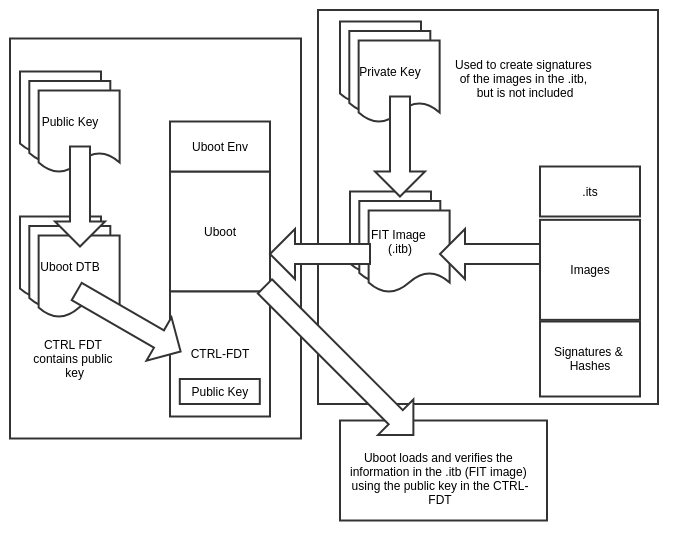
As we can see in the above diagram, there are several components that contribute to enable verified boot and allow for an image (another name for firmware) to be successfully ran on a system:
- The device tree binary (DTB, but not to be confused with the one used by the Linux kernel)
- The encryption primitives or “keys” (asymmetric cryptography in this case)
- The encryption process (signature validation)
- The building of a FIT image
- The process of validating a FIT image
Nothing , but questions?
Unfortunatey, to an onlooker not burried in this domain or a “pro” in either the Linux or U-boot camps, things can look a bit confusing:
- Does U-Boot support Verified Boot by default? Does it need some configuration/compilation flags or defines set?
- What is a DTB? Why is there a DTB in U-Boot and another for the Linux kernel? Are they the same?
- What is a Control FDT? How does this contribute to the process?
- What is an ITS? What is a FIT image? Is it the same as a uImage?
- How do I get or determine the memory addresses used? These seem like arbitrary numbers?
- How do I use all of this and finally get a Verified Boot using a FIT image?
Here are the answers!
All of these are valid questions, so let us explore them at a layman’s level:
U-Boot does NOT support Verified Boot by default. It needs at a minimum the following defines present in your embedded system’s board config (usually found in rootdirOfUbootSource/configs):
CONFIG_ENABLE_VBOOT=y
CONFIG_RSA=y
CONFIG_FIT=y
CONFIG_FIT_SIGNATURE=y
CONFIG_OF_CONTROL=y
CONFIG_OF_SEPARATE=y
CONFIG_OF_LIBFDT=y
CONFIG_RSA=y
CONFIG_FIT=y
CONFIG_FIT_SIGNATURE=y
CONFIG_OF_CONTROL=y
CONFIG_OF_SEPARATE=y
CONFIG_OF_LIBFDT=y
For extra verbosity:
# CONFIG_FIT_VERBOSE is not set
For a useful commandline utility in U-Boot:
CONFIG_CMD_IMI=y
A DTB when typically talked about refers to the the tree, which is used to specify components and addressing information for the Linux kernel at boot. ARM-based systems in general don’t enumerate their peripherals and also to save time, is passed directly to the Linux kernel at boot time. Confusingly, Uboot also uses the term DTB and uses the same file format/extension called DTS or Device Tree Structure. For Verified Boot, it is called a Control FDT or Flat Device Tree and needs to be compiled as well.
It usually looks like this:
/dts-v1/;
#include "at91sam9260.dtsi"
/ {
model = "CustomBoard";
compatible = "atmel,at91sam9260", "atmel,at91sam9";
#include "at91sam9260.dtsi"
/ {
model = "CustomBoard";
compatible = "atmel,at91sam9260", "atmel,at91sam9";
chosen {
stdout-path = "serial0:115200n8";
};
memory {
reg = <0x20000000 0x4000000>;
};
ahb {
apb {
};
};
};
It is another unfortunate thing that the overall process of creating a device tree structure is not trivial. Often you have to look at numerous existing boards using similar hardware and a process of trial/error to arrive at the correct one. On the positive side, if most of your hardware is instantiated by the hardware itself, we can just use the presence of a working file for our board – we will eventually APPEND the cryptographic information for Verified Boot!
Then we have the ITS or image source files. These are descriptive DTB-like files that are used to describe and create a Flat Tree Image (FIT). A FIT image (extension itb) is a container that may hold at least one image and configuration, and cryptographic material (optional technically). For a single Kernel Image, Linux kernel DTB and signing, see the following example:
/dts-v1/;
/{
description = "Configuration to load a Basic Kernel";
#address-cells = <1>;
images {
linux_kernel@1 {
description = "Linux zImage";
data = /incbin/("../bin/targets/at91-custom/myboard.zImage");
type = "kernel";
arch = "arm";
os = "linux";
compression = "none";
load = <0x20008000>;
entry = <0x20008000>;
hash@1 {
algo = "sha256";
};
};
fdt@1 {
description = "FDT blob";
data = /incbin/("../bin/targets/at91-custom/myboard.dtb");
type = "flat_dt";
arch = "arm";
compression = "none";
load = <0x28000000>;
hash@1 {
algo = "sha256";
};
};
};
configurations {
default = "config@1";
config@1{
description = "Plain Linux";
kernel = "linux_kernel@1";
fdt = "fdt@1";
signature@1{
algo = "sha256,rsa2048";
key-name-hint = "dev_key";
sign-images = "fdt", "kernel";
};
};
};
};
/{
description = "Configuration to load a Basic Kernel";
#address-cells = <1>;
images {
linux_kernel@1 {
description = "Linux zImage";
data = /incbin/("../bin/targets/at91-custom/myboard.zImage");
type = "kernel";
arch = "arm";
os = "linux";
compression = "none";
load = <0x20008000>;
entry = <0x20008000>;
hash@1 {
algo = "sha256";
};
};
fdt@1 {
description = "FDT blob";
data = /incbin/("../bin/targets/at91-custom/myboard.dtb");
type = "flat_dt";
arch = "arm";
compression = "none";
load = <0x28000000>;
hash@1 {
algo = "sha256";
};
};
};
configurations {
default = "config@1";
config@1{
description = "Plain Linux";
kernel = "linux_kernel@1";
fdt = "fdt@1";
signature@1{
algo = "sha256,rsa2048";
key-name-hint = "dev_key";
sign-images = "fdt", "kernel";
};
};
};
};
Ignoring the addressing information, we can see that there are a few mandatory fields (description, address-cells, images and configurations). The zImage is the RAW Linux zImage, no compression (its self contained) and it DOES NOT NEED TO BE CREATED WITH mkimage – let the Linux build process do this (if enabled). Then there is the FDT – it is self explanatory. However both images have an entry for what hash algorithm to be used by the verification process.
Finally, there is the configurations element, It contains one config, specifies the images, and most importantly the signature element. This was harder to understand from all of the documentation, but it specifies the cryptographic operations (hash and signature algorithms), the cryptographic key, and which images hash and sign. WOW!
When we finally get to making a FIT image, this file will be used to help drive the process.
It is important to note though that a uImage (either type) does not equate to a FIT image. In the U-Boot world, it is a legacy type of image container used by U-Boot and is really the predecessor of a FIT image. In the Linux kernel world, uImage means “uncompressed Image”. They cannot be more unlike in this case.
And then once we manage to get through the confusing acronym salad, and created a FIT image how do we get it to load? Unfortunately, right before that process, there are a few more steps (I know it’s tedious) and we still need to make it so let’s walk through a simple pseudo shell script:
#!/bin/sh
key_dir="keys"
key_name="dev_key"
MKIMG="/bin/mkimage"
DTC="/usr/bin/dtc"
CPP="/usr/bin/cpp"
OPENSSL="/usr/bin/openssl"
# Create the signing key if not present
if [ ! -d "${key_dir}" ]; then
mkdir -p ${key_dir}
#Generate a private signing key (RSA2048):
$OPENSSL genrsa -F4 -out \
"${key_dir}"/"${key_name}".key 2048
# Generate a public key:
$OPENSSL req -batch -new -x509 \
-key "${key_dir}"/"${key_name}".key \
-out "${key_dir}"/"${key_name}".crt
fi
FIT_ITS="myboard.its"
OUTPUT_FIT_NAME=”myboard.itb”
OUTPUT_FIT_DIR=”output-fit”
FIT_IMG=”${OUTPUT_FIT_DIR}/${OUTPUT_FIT_NAME}”
rm -rf $OUTPUT_FIT_DIR; mkdir -p $OUTPUT_FIT_DIR
# Generate fitImage with space for signature:
echo "create FIT with space - no signing"
echo " --------------------------------"
DOPTS="-I dts -O dtb -p 0x1000"
$MKIMG -D "${DOPTS}" \
-f "${FIT_ITS}" -k "${key_dir}" "${FIT_IMG}"
# Now add them and sign them
echo "Sign images with our keys"
echo " --------------------------------"
CTRL_FDT=”myboard_uboot.dtb”
$MKIMG -D "${DOPTS}" -F \
-k "${key_dir}" -K ${CTRL_FDT} -r "${FIT_IMG}"
echo ""
echo "Adding FDT to ubootbin"
# Add FDT to Uboot, where UBOOT_BIN is the path to the raw uboot
# without the DTB automatically appended
cat ${UBOOT_BIN}-nodtb.bin ${CTRL_FDT} > ${UBOOT_BIN}-wdtb.bin
echo "DONE -----------------------------"
And there you have it. When the image is created, you should see something similar to the following:
FIT description: Configuration to load a Basic Kernel
Created: Thu Sep 7 15:01:56 2017
Image 0 (linux_kernel@1)
Description: Linux zImage
Created: Thu Sep 7 15:01:56 2017
Type: Kernel Image
Compression: uncompressed
Data Size: 1108120 Bytes = 1082.15 kB = 1.06 MB
Architecture: ARM
OS: Linux
Load Address: 0x20008000
Entry Point: 0x20008000
Hash algo: sha256
Hash value: 5f68e173f68ce99274de3bdb8cc70f325f3b34d0c477e80b5e462e4c2aeeec0a
Image 1 (fdt@1)
Description: FDT blob
Created: Thu Sep 7 15:01:56 2017
Type: Flat Device Tree
Compression: uncompressed
Data Size: 21781 Bytes = 21.27 kB = 0.02 MB
Architecture: ARM
Hash algo: sha256
Hash value: c1f684d457ade1206ca8fef8743c39914d0b2e0175356e855edacae4695e482a
Default Configuration: 'config@1'
Configuration 0 (config@1)
Description: Plain Linux
Kernel: linux_kernel@1
FDT: fdt@1
Created: Thu Sep 7 15:01:56 2017
Image 0 (linux_kernel@1)
Description: Linux zImage
Created: Thu Sep 7 15:01:56 2017
Type: Kernel Image
Compression: uncompressed
Data Size: 1108120 Bytes = 1082.15 kB = 1.06 MB
Architecture: ARM
OS: Linux
Load Address: 0x20008000
Entry Point: 0x20008000
Hash algo: sha256
Hash value: 5f68e173f68ce99274de3bdb8cc70f325f3b34d0c477e80b5e462e4c2aeeec0a
Image 1 (fdt@1)
Description: FDT blob
Created: Thu Sep 7 15:01:56 2017
Type: Flat Device Tree
Compression: uncompressed
Data Size: 21781 Bytes = 21.27 kB = 0.02 MB
Architecture: ARM
Hash algo: sha256
Hash value: c1f684d457ade1206ca8fef8743c39914d0b2e0175356e855edacae4695e482a
Default Configuration: 'config@1'
Configuration 0 (config@1)
Description: Plain Linux
Kernel: linux_kernel@1
FDT: fdt@1
The output is a Uboot binary image ready to flashed onto a device and load a FIT image that uses the SAME cryptographic key. Neat, but we are not done quite yet unfortunately. First we need to flash the device, and two, load the image for execution (some of you might have been keen and got to this part before hand).
Ignoring the semantics of flashing your device to a verified boot enabled uboot, we are going to assume that it is now running. You can check this by running version at the uboot prompt and verify the compilation timestamp.
To TFTP your FIT image (the .itb one) onto your device, you can run:
setenv serverip <yourTFTPSERVERIP>
setenv ipaddr <yourIPDEVICEADDR>
tftp myboard.itb 0x23000000
setenv ipaddr <yourIPDEVICEADDR>
tftp myboard.itb 0x23000000
We used 0x23000000, but it could be another free address.
Next, verify the contents using iminfo. The command “fdt” can also be used to walk the tree as well once loaded.
#> iminfo 0x23000000
## Checking Image at 23000000 ...
FIT image found
FIT description: Configuration to load a Basic Kernel
Image 0 (linux_kernel@1)
Description: Linux zImage
Type: Kernel Image
Compression: uncompressed
Data Start: 0x200000dc
Data Size: 1107984 Bytes = 1.1 MiB
Architecture: ARM
OS: Linux
Load Address: 0x20008000
Entry Point: 0x20008000
Hash algo: sha256
Hash value: 24aefe59bc0f11e187fdd4bce2a5a9c0d6554a7f8071687b87b20047597eaa9b
Image 1 (fdt@1)
Description: FDT blob
Type: Flat Device Tree
Compression: uncompressed
Data Start: 0x2010e9dc
Data Size: 21781 Bytes = 21.3 KiB
Architecture: ARM
Hash algo: sha256
Hash value: c1f684d457ade1206ca8fef8743c39914d0b2e0175356e855edacae4695e482a
Default Configuration: 'config@1'
Configuration 0 (config@1)
Description: Plain Linux
Kernel: linux_kernel@1
FDT: fdt@1
## Checking hash(es) for FIT Image at 20000000 ...
Hash(es) for Image 0 (linux_kernel@1): sha256+
Hash(es) for Image 1 (fdt@1): sha256+
## Checking Image at 23000000 ...
FIT image found
FIT description: Configuration to load a Basic Kernel
Image 0 (linux_kernel@1)
Description: Linux zImage
Type: Kernel Image
Compression: uncompressed
Data Start: 0x200000dc
Data Size: 1107984 Bytes = 1.1 MiB
Architecture: ARM
OS: Linux
Load Address: 0x20008000
Entry Point: 0x20008000
Hash algo: sha256
Hash value: 24aefe59bc0f11e187fdd4bce2a5a9c0d6554a7f8071687b87b20047597eaa9b
Image 1 (fdt@1)
Description: FDT blob
Type: Flat Device Tree
Compression: uncompressed
Data Start: 0x2010e9dc
Data Size: 21781 Bytes = 21.3 KiB
Architecture: ARM
Hash algo: sha256
Hash value: c1f684d457ade1206ca8fef8743c39914d0b2e0175356e855edacae4695e482a
Default Configuration: 'config@1'
Configuration 0 (config@1)
Description: Plain Linux
Kernel: linux_kernel@1
FDT: fdt@1
## Checking hash(es) for FIT Image at 20000000 ...
Hash(es) for Image 0 (linux_kernel@1): sha256+
Hash(es) for Image 1 (fdt@1): sha256+
At this point, assuming the bootargs and everything is correct, we can boot the image:
#> bootm 0x23000000
It should greet you with output such as the following and continue booting a Linux kernel :)
## Loading kernel from FIT Image at 23000000 ...
Using 'config@1' configuration
Verifying Hash Integrity ... sha256,rsa2048:dev_key+ OK
Trying 'linux_kernel@1' kernel subimage
Description: Linux zImage
Type: Kernel Image
Compression: uncompressed
Data Start: 0x230000dc
Data Size: 1107984 Bytes = 1.1 MiB
Architecture: ARM
OS: Linux
Load Address: 0x20008000
Entry Point: 0x20008000
Hash algo: sha256
Hash value: 24aefe59bc0f11e187fdd4bce2a5a9c0d6554a7f8071687b87b20047597eaa9b
Verifying Hash Integrity ... sha256+ OK
## Loading fdt from FIT Image at 23000000 ...
Using 'config@1' configuration
Trying 'fdt@1' fdt subimage
Description: FDT blob
Type: Flat Device Tree
Compression: uncompressed
Data Start: 0x2310e9dc
Data Size: 21781 Bytes = 21.3 KiB
Architecture: ARM
Hash algo: sha256
Hash value: c1f684d457ade1206ca8fef8743c39914d0b2e0175356e855edacae4695e482a
Verifying Hash Integrity ... sha256+ OK
Loading fdt from 0x2310e9dc to 0x28000000
Booting using the fdt blob at 0x28000000
Loading Kernel Image ... OK
Loading Device Tree to 27f2f000, end 27f37514 ... OK
Starting kernel ...
Booting Linux on physical CPU 0x0
Using 'config@1' configuration
Verifying Hash Integrity ... sha256,rsa2048:dev_key+ OK
Trying 'linux_kernel@1' kernel subimage
Description: Linux zImage
Type: Kernel Image
Compression: uncompressed
Data Start: 0x230000dc
Data Size: 1107984 Bytes = 1.1 MiB
Architecture: ARM
OS: Linux
Load Address: 0x20008000
Entry Point: 0x20008000
Hash algo: sha256
Hash value: 24aefe59bc0f11e187fdd4bce2a5a9c0d6554a7f8071687b87b20047597eaa9b
Verifying Hash Integrity ... sha256+ OK
## Loading fdt from FIT Image at 23000000 ...
Using 'config@1' configuration
Trying 'fdt@1' fdt subimage
Description: FDT blob
Type: Flat Device Tree
Compression: uncompressed
Data Start: 0x2310e9dc
Data Size: 21781 Bytes = 21.3 KiB
Architecture: ARM
Hash algo: sha256
Hash value: c1f684d457ade1206ca8fef8743c39914d0b2e0175356e855edacae4695e482a
Verifying Hash Integrity ... sha256+ OK
Loading fdt from 0x2310e9dc to 0x28000000
Booting using the fdt blob at 0x28000000
Loading Kernel Image ... OK
Loading Device Tree to 27f2f000, end 27f37514 ... OK
Starting kernel ...
Booting Linux on physical CPU 0x0
And there you have it – a Verified Boot example assuming your board is supported...
Further resources:
https://lwn.net/Articles/571031/
https://www.denx.de/wiki/pub/U-Boot/Documentation/multi_image_booting_sc...
http://elinux.org/images/f/f4/Elc2013_Fernandes.pdf
https://github.com/lentinj/u-boot/blob/master/doc/uImage.FIT/source_file...
https://lxr.missinglinkelectronics.com/uboot/doc/uImage.FIT/howto.txt
https://linux.die.net/man/1/mkimage
https://www.timesys.com/security/secure-boot-encrypted-data-storage/
http://events.linuxfoundation.org/sites/events/files/slides/elce-2014.pdf
http://free-electrons.com/pub/conferences/2013/elce/petazzoni-device-tre...
- 1 of 28
- next ›